
String Length
This problem is about finding how many characters are inside a string. You are given one piece of text, and your job is to return its length as a number.
Every character counts. That includes letters, digits, spaces, and symbols if they are part of the string. If the string is empty, its length is 0. If it has one character, the answer is 1. So the result must match the real number of characters that are present.
For example, "hello" has length 5. The empty string "" has length 0. A single space still counts as one character, so it gives the answer 1. The same is true for punctuation marks and number characters too.
The answer is always one number. You do not trim the string, clean it, or change its letters first. You simply count how many characters it already contains from beginning to end.
Example Input & Output
Example 1: "hello" has 5 characters
Example 2: Empty string has length 0
Example 3: "world" has 5 characters
Algorithm Flow
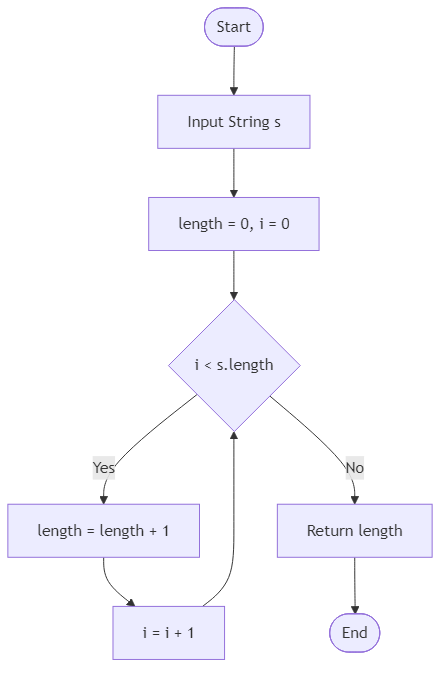
Solution Approach
The simplest solution is to return the length of the string directly. This problem does not ask you to trim spaces, ignore punctuation, or count only letters. It wants the full character count of the string exactly as it is given.
Because of that, the main thing to remember is that every character matters. Letters count, number characters count, spaces count, and symbols count. For example, the string " " has length 1 even though it looks visually empty at a glance. That is an important detail because some people accidentally assume blank-looking strings should count as zero.
In JavaScript, the solution is very direct:
The length property gives the number of characters stored in the string. That already covers all of the tested cases. For "hello", the value is 5. For the empty string "", the value is 0. For a single character such as "a" or a single space, the value is 1.
You could also count characters manually with a loop, but that would only repeat work the language already does for you. A manual loop might look educational, but it would not make the solution clearer for this problem. Since the task is specifically about the string's length, using the built-in length property is the most natural and readable option.
This approach also handles edge cases automatically. Empty strings return 0. Long strings return their full size. Strings made only of digits like "1234567890" still return the correct character count, which is 10. No preprocessing is needed before reading the length.
The time complexity is effectively O(1) in the way this problem is normally treated, because reading the stored length is a constant-time built-in operation in common languages and runtimes. The extra space complexity is also O(1) because no new structure is created.
So the full strategy is: do not modify the string, do not skip any characters, and return its length exactly as stored.
Best Answers
class Solution {
    public int get_string_length(String s) {
        return s.length();
    }
}Comments (0)
Join the Discussion
Share your thoughts, ask questions, or help others with this Challenge.