
In Artisan Label String, you are given an array of label names and asked to return one string that lists those labels in sorted order, one per line.
So this is not just a sorting problem. The final output is a single text block. After sorting the labels, you need to join them with newline characters, which means the result should look like several lines stacked on top of each other instead of one long sentence.
The labels themselves should stay exactly as they were. Do not lowercase them, uppercase them, trim them, or remove duplicates. If a label appears twice, it should appear twice in the final string too. The output for labels = ["Silver Lace","Aurora Bloom","Aurora Bloom","Cedar Mist"] should be a four-line string with the two Aurora Bloom entries first, then Cedar Mist, then Silver Lace.
The examples also show that original casing matters to the final order. For instance, labels = ["amber","Citrus Rise","Bluff"] becomes Bluff\nCitrus Rise\namber. So the task is to sort the labels according to the judge's direct string order, then join them with newline separators.
Example Input & Output
A single label comes back unchanged because it already satisfies the order.
The labels are sorted and then joined into one string with newline separators.
The output keeps the original casing while following the direct string order expected by the judge.
Algorithm Flow
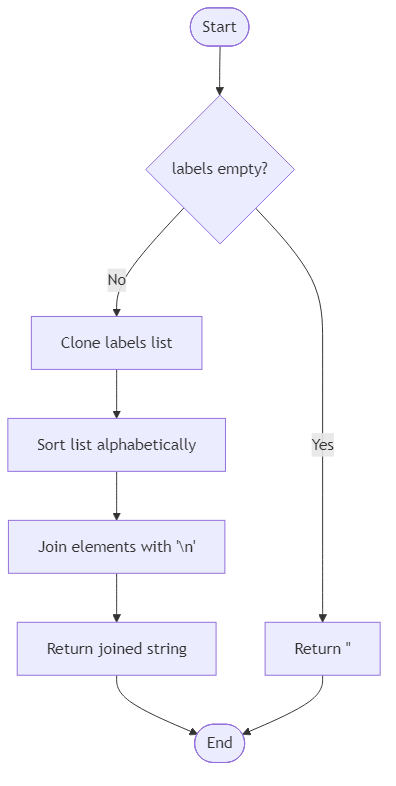
Solution Approach
A straightforward way to solve this problem is to sort the label array and then join the sorted labels with newline characters. That directly mirrors the two things the problem asks for: ordering the labels and formatting them as one multi-line string.
The one detail worth paying attention to is the comparison rule. The examples show that you should preserve the original casing of every label and let the language's direct string ordering decide the result. For example, ["amber", "Citrus Rise", "Bluff"] becomes Bluff\nCitrus Rise\namber, which tells you not to normalize everything to lowercase before sorting. If you lowercase all labels just for comparison, you could change the expected order. So the safest interpretation is to sort the strings as they are and keep the text untouched.
In JavaScript, the solution can stay very small:
The copy created with [...labels] is optional, but it is helpful if you do not want to mutate the original input. After that, join('\n') creates the exact output shape the problem wants. If the list is empty, joining an empty array gives an empty string. If there is only one label, the result is just that label with no extra newline before or after it.
This approach also keeps duplicates automatically. Sorting does not remove repeated values, so if "Aurora Bloom" appears twice, both copies remain in the final string. That matches the sample with duplicate labels.
The time complexity is O(n log n) because the sorting step dominates the work. Joining the strings takes linear time after that. The extra space is O(n) if you create a copy before sorting, plus the final output string itself.
So the full idea is simple but exact: do a normal string sort on the original labels, keep each label unchanged, then connect them with newline characters to produce one final formatted string.
Best Answers
import java.util.*;

class Solution {
    public String compose_artisan_labels(String[] labels) {
        if (labels.length == 0) return "";
        String[] sortedArr = labels.clone();
        Arrays.sort(sortedArr);
        return String.join("\n", sortedArr);
    }
}Comments (0)
Join the Discussion
Share your thoughts, ask questions, or help others with this Challenge.